Posts

Unity Tutorial 6

Image
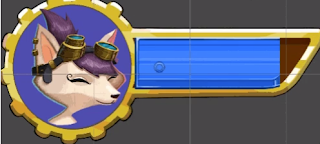
 This week the tutorial focused on visual styling. Which consisted of adding a health bar for the player character. This was done by adding a UI (user interface) canvas into the hierarchy. This worked in a very similar way to how I created Game Over text for my game last year. The visual elements were taken from the ready made assets that came with the tutorial, however they all needed to be resized. After inserting the portrait, I then went about the process of masking which helped make the blue bar look like it was at different levels of health. Next up I created a new frog dude character. I then added RayCasting the player script, I had heard of Ray Casting from advertisements for one of the many Skyrim special editions so finding out how it works gave a real peak behind the curtain to how games are actually made.
Project 04: Prototype

Image
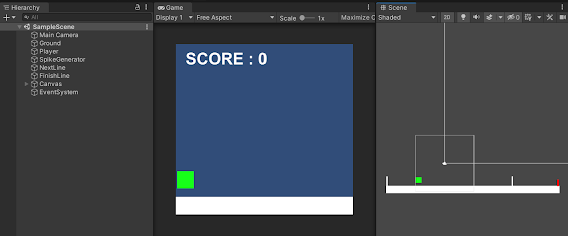
  With my prototype complete I can already tell that this will be a fun game to play. So far all I have is a basic game with no real assets to speak of except for a few squares symbolizing the player, obstacles and the ground. The scripts I made were simple enough, the most interesting thing I've made so far is a Spike Generator which shoots out obstacles, this is kept offscreen so when the obstacles it generates come out it looks like they are standing still and that the player is moving forward, unfortunately there's not much skill involved in avoiding them as they come out one at a time every 2 seconds or so. I'll have to work on randomising the obstacles being generated to make the game more challenging. The score board doesn't work as of yet, I hope to have that working by next week.

Project Part 03: Game Design Document

Image
  Name Possibilities: Leading names highlighted Polygondawanaland: The VideoGame Lizard Wizard  The Lizard Wizard and the Crumbling Castle Crumbling Castle Premise: You play as The Lizard Wizard as he makes his way through a barren wasteland till he reaches the crumbling castle. Unfortunately, these wastelands go on endlessly as the Lizard Wizard has actually found himself in the mythical world of Polygondawanaland. So it is up to the player to keep the Lizard Wizard alive for as long as possible by avoiding deadly barrels of toxic waste. Obstacles: The obstacles in this game are barrels filled with radioactive waste. Environmentalism is a huge theme in King Gizzard's music and so it was decided to portray that in the game with the same type of radioactive barrels that can be seen on the album cover of their album “Flying Microtonal Banana”. Goal and Victory Conditions: The game is an endless runner and as such has no definitive ending besides when the player hits an obstacle ...

Reading 09: The Review Must Go On

Image
  https://www.wikihow-fun.com/Dress-Like-the-Nostalgia-Critic I was sad to see that no one had reviewed my chapter besides Irene, ah well, it was my own fault for missing class. This week I went through my colleagues chapters, unfortunately Nasim hadn't uploaded anything. Emma had cut down a few things in the middle of the chapter and it reads much better. I cut down a lot of places where I tend to go on a tangent that has nothing to do with my topic.

Unity Tutorial 5

Image
I got a bit of Deja Vu this week as I was working on camera controls. The tutorial wanted me to install cinemachine but since thats what I had used last year on my game I figured I could see where things were going. Essentially all I had to do was add a 2D camera, and then drag the player sprite into the cameras inspector which then made the camera follow the player around, just like in my last game. After that I used the CinemaConfiner extension to keep the camera from going out of bounds and showng the player what was outside of the map. This was done by creating a border around the map and adding a collider to bo th the border and the camera.

Unity Tutorial 04

Image
  Screenshot of Sprite Sheet The lessons this week were pretty interesting and exciting to get done, from the start of these tutorial I was excited to do animation so when I saw the title sprite animation I got pretty hyped. The UI for creating 2D games in Unity is remarkably user friendly and helpful, I'm looking forward to seeing how creating character animation works when using my own assets and not these tutorial sprites. Setting Parameters would have been an impossible task for me to have figured out without this tutorial, using a blend tree was a fun thing to learn to do, I'm not sure how I'll do without the tutorial there to guide me so I have the page book marked just in case I need my training wheels back...

Project Part 02: Short Treatment

Image
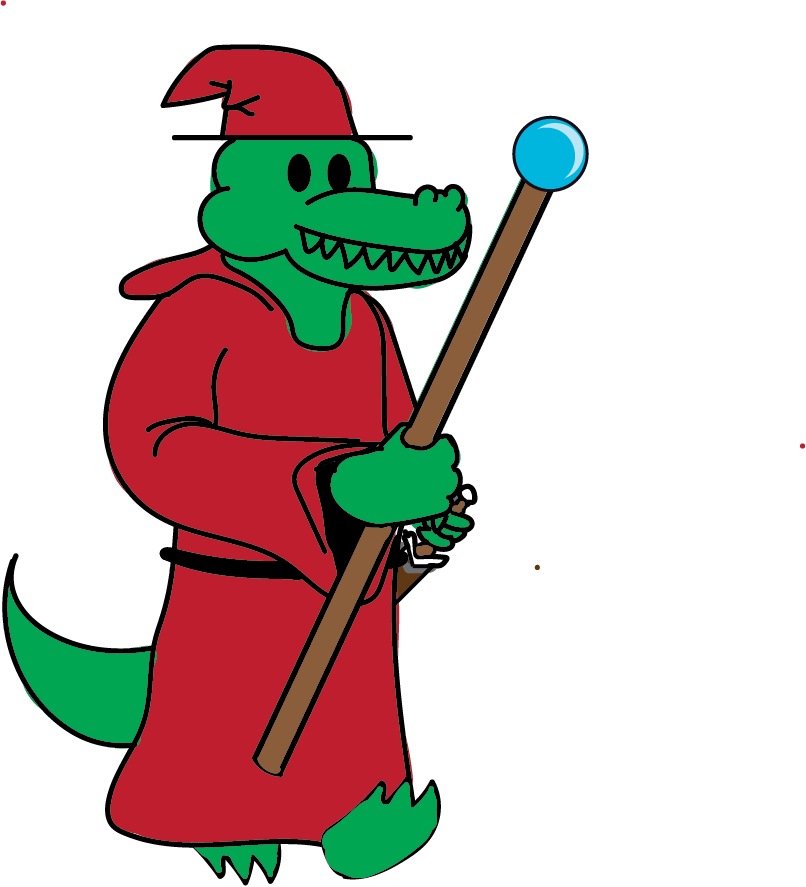
  Test Model For Possible Player Character Introduction "Polygondawanaland: The Video Game" is a fan made adaptation of the classic album King Gizzard album of the same name. The game aims to use trippy visuals and fun gameplay to pair with the music of the album creating an entirely new experience for both music fans and video game fans. Background In this game, you play as Kenny the Lizard Wizard as he journeys through Crumbling Castles and Deserted Dunes as he makes his way to his enchanted homeland known only as Polygondawanaland. Along his journey the player will have the Lizard Wizard avoid many harmful obstacles. Game Development Outline Plan Monday 28th March 2022-  Game Design Document Monday 31st March 2022- Project Prototype Monday 14th April 2022- Prototype Monday 21st April 2022- 1st Playable Monday 05th May 2022- Final Game Description You begin the game in the Crumbling Castle, as the song of the same name plays, Kenny must make his way out of the castle jumpin...